
| 일 | 월 | 화 | 수 | 목 | 금 | 토 |
|---|---|---|---|---|---|---|
| 1 | 2 | 3 | 4 | 5 | 6 | |
| 7 | 8 | 9 | 10 | 11 | 12 | 13 |
| 14 | 15 | 16 | 17 | 18 | 19 | 20 |
| 21 | 22 | 23 | 24 | 25 | 26 | 27 |
| 28 | 29 | 30 | 31 |
- Firestore
- xcode 공백 표시
- JPEG
- spm 에러
- 함께자라기
- heic
- 타뷸레이션
- .pbxproj
- swiftdata
- TestFlight
- 무한스크롤
- Tuist
- SwiftUI
- nidthirdpartylogin
- 팀 개발을 위한 git
- png
- 테스트 타겟
- xcode 엔터 표시
- 캐러셀
- webp
- Cocoa Pod
- JPG
- 클린 아키텍처
- github 시작하기
- contentalignmentpoint
- 코드스쿼드
- NSTextStorage
- fetchdescriptor
- swift 모듈화
- NSTextStorageDelegate
- Today
- Total
Sure, Why not?
SwiftUI) Custom TextField Placeholder 본문
TextField의 Palceholder를 커스텀하는 것은 자주 생기는 일이다.
SwiftUI에서 크게 iOS 15 이후와 이전 버전으로 적용 방식이 나뉘어지는데
어떻게 할 수 있는지 정리하고자 한다.
iOS 15이상에서 TextField Placeholder 커스텀하기
init(_:text:prompt:) | Apple Developer Documentation
Creates a text field with a text label generated from a title string.
developer.apple.com
@available(iOS 15.0, macOS 12.0, tvOS 15.0, watchOS 8.0, *)
nonisolated public init<S>(
    _ title: S,
    text: Binding<String>,
    prompt: Text?
) where S : StringProtocol
title은 prompt가 nil이면 나타난다.
text는 수정할 텍스트를 바인딩으로 전달해야 한다.
iOS 15 부터 TextField에 prompt 파라미터가 추가되었다.
해당 파라미터는 Text? 타입으로
SwiftUI의 Text뷰를 직접 전달해서 스타일링한다.
코드예시
TextField(
    "아이디",
    text: $username,
    prompt: Text("아이디를 입력하세요")
        .foregroundStyle(.red)
        .font(.title)
)
iOS 15 미만에서 TextField Placeholder 커스텀하기
SwiftUI. How to change the placeholder color of the TextField?
I want to change the placeholder color of the TextField, but I can't find a method for it. I tried to set foregroundColor and accentColor, but it doesn't change the placeholder color. Here is the...
stackoverflow.com
ZStack을 이용해서 TextField와 겹쳐서
마치 Placeholder처럼 보이도록 하였다.
15미만에서도 자연스럽게 사용할 수 있게 된다.
ZStack(alignment: .leading) {
    if username.isEmpty {
        Text("이름을 입력해주세요")
            .foregroundColor(.red)
            .font(.title)
    }
    TextField("", text: $username)
}
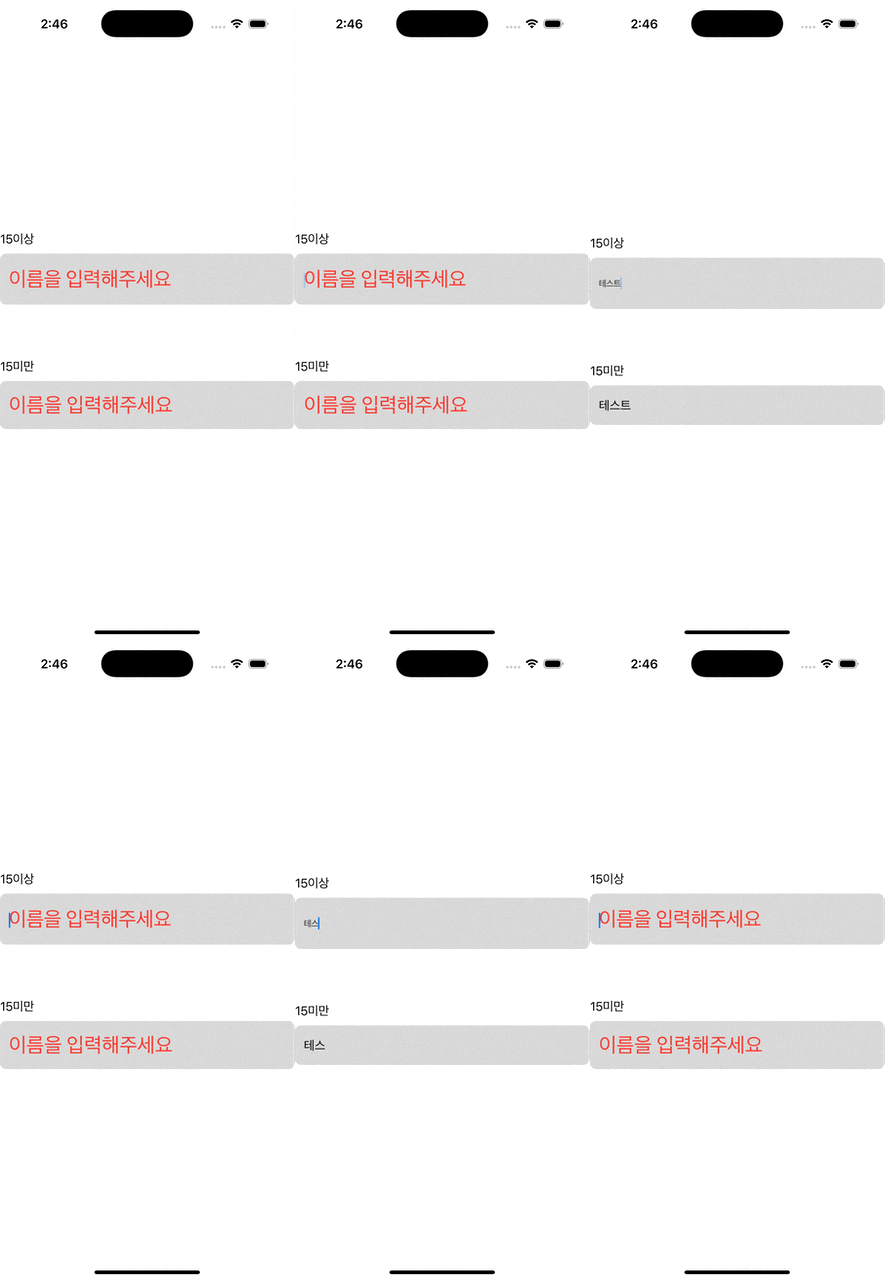
결과
'💻' 카테고리의 다른 글
| .pbxproj 충돌 (0) | 2025.04.15 |
|---|---|
| 특수문자 체크 (1) | 2025.04.03 |
| Naver 로그인 (0) | 2025.03.22 |
| Google 로그인 (0) | 2025.03.21 |
| Apple 로그인 (0) | 2025.03.19 |


